VagrantでEC2にアクセスする
ベイグラントと読むらしい。Vagrantで AWS EC2インスタンス(RHEL5.5)を作成するだけが頼りです。
Vagrant のAWS-Provider インストールというのをしてみる。
$ vagrant plugin install vagrant-aws結構時間かかる。時間かかるなー。まだ終わらないので、Vagrantfileに記述する情報を調べる。
参考サイトから引用。こういうVagrantfileを作る必要があるらしいけど、アクセスキーとかシークレットキーとかもらってないので調べる。
Vagrant.configure("2") do |config|  config.vm.box = "dummy"
  config.vm.provider :aws do |aws, override|    aws.access_key_id = 'アクセスキーID'    aws.secret_access_key = 'シークレットキーID'    aws.region = 'ap-northeast-1'    aws.instance_type = 't1.micro'    aws.ami = 'ami-3ddd543c'    aws.security_groups = ['仮想マシンに設定するセキュリティグループ名']    aws.keypair_name = '仮想マシンに設定するキーペア名'    aws.tags = {      'Name' => 'サーバ名等、EC2インスタンスの名前に相当する名称'    }    # aws.use_iam_profile = ''    # aws.subnet_id = ''    # aws.private_ip_address = ''    override.ssh.username = "root"    override.ssh.private_key_path = 'pvivatekey(*.pem)のフルパス'
  endend
と思ってたらインストールが完了した。
$ vagrant plugin install vagrant-awsInstalling the 'vagrant-aws' plugin. This can take a few minutes...Installed the plugin 'vagrant-aws (0.4.1)'!AWS EC2 用のDummyBox 取得&初期化というのをしてみる。
$ vagrant box add dummy https://github.com/mitchellh/vagrant-aws/raw/master/dummy.boxDownloading box from URL: https://github.com/mitchellh/vagrant-aws/raw/master/dummy.boxExtracting box...e: 0/s, Estimated time remaining: --:--:--)--)Successfully added box 'dummy' with provider 'aws'!vagrant init そして、上記のVagrantfileを作成する。なのでAPIのキーみたいの調べる。 ここにあるっぽい。
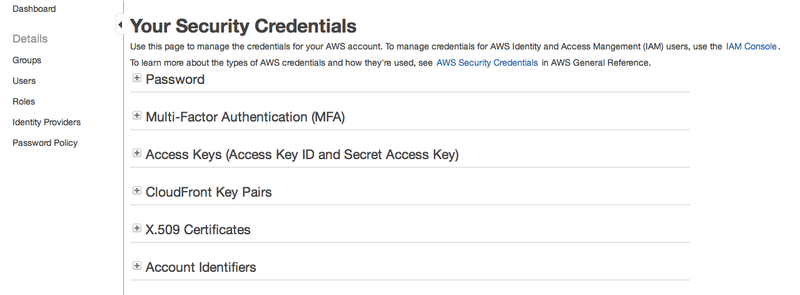
Access Keys (Access Key ID and Secret Access Key)のCreate New Access Keyを押してみる。作成できた。rootkey.csvというのももらった。別にsecret access keyが書いてあるだけなのでしっかり保存しとけよっていうことらしい。
ではいざVagrantfileをつくってupしてみる。 amiがなかったから作ってみた。
vagrant 起動(= 仮想サーバ作成)をしてみる。
$ vagrant up --provider=aws悲しいです。エラーでまくり。
Bringing machine 'default' up with 'aws' provider...WARNING: Nokogiri was built against LibXML version 2.8.0, but has dynamically loaded 2.9.1[fog][WARNING] Unable to load the 'unf' gem. Your AWS strings may not be properly encoded.[default] Warning! The AWS provider doesn't support any of the Vagranthigh-level network configurations (`config.vm.network`). Theywill be silently ignored.An error occurred while executing multiple actions in parallel.Any errors that occurred are shown below.
An unexpected error ocurred when executing the action on the'default' machine. Please report this as a bug:
getaddrinfo: nodename nor servname provided, or not known (SocketError)Nokogiriってなんだよ。。
unfっていうのをインストールしてみる。
$ sudo gem install unfPassword:Fetching: unf_ext-0.0.6.gem (100%)Building native extensions. This could take a while...Successfully installed unf_ext-0.0.6Fetching: unf-0.1.3.gem (100%)Successfully installed unf-0.1.3Parsing documentation for unf_ext-0.0.6unable to convert "\xCF" from ASCII-8BIT to UTF-8 for lib/unf_ext.bundle, skippingInstalling ri documentation for unf_ext-0.0.6Parsing documentation for unf-0.1.3Installing ri documentation for unf-0.1.32 gems installedあんま関係ないかも。。エラー変わらず。
aws.region = “ap-northeast-1a”を、aws.region = “ap-northeast-1”したらいいらしい。
おおいい感じと思ったら別のエラーが出た。
[default] Waiting for instance to become "ready"...[default] Waiting for SSH to become available...[default] Machine is booted and ready for use![default] Rsyncing folder: /Users/hoge/vagrant/ => /vagrantAn error occurred while executing multiple actions in parallel.Any errors that occurred are shown below.
An error occurred while executing the action on the 'default'machine. Please handle this error then try again:
There was an error when attempting to rsync a share folder.Please inspect the error message below for more info.
Host path: /Users/hoge/vagrant/Guest path: /vagrantError: Warning: Permanently added '11.111.111.111' (RSA) to the list of known hosts.protocol version mismatch -- is your shell clean?(see the rsync man page for an explanation)rsync error: protocol incompatibility (code 2) at compat.c(181) [sender=3.0.9]
あーなんかAMIつくったときにもう1個インスタンスが出来てたらしくて一個止めたらなんか入れた。入れたけどこれって単純に接続してるだけじゃん。なんだこれ。
Vagrant 1.1 で EC2 を vagrant upなるほどー。おらが思ってたのとちゃう。。 単にVagrantつかってEC2にアクセスできるだけか。。
[AWS][Vagrant]vagrant-awsを利用したイイカンジ(?)のAWS開発フロー
なんかすごいけどまだよくわからない。 さくらにしても、AWSにしても俺はローカルと開発サーバと本番サーバを同じ環境にしたくて、しかもローカルの代わりにAWSは使いたくない。お金かかるし。だから本番サーバのAWSに合わせたVagrantのBOXを自分でつくりたい。
Packerっていうのでつくれそう。 https://speakerdeck.com/ryuzee/vagrant-plus-amazon-ec2これに下記があった。 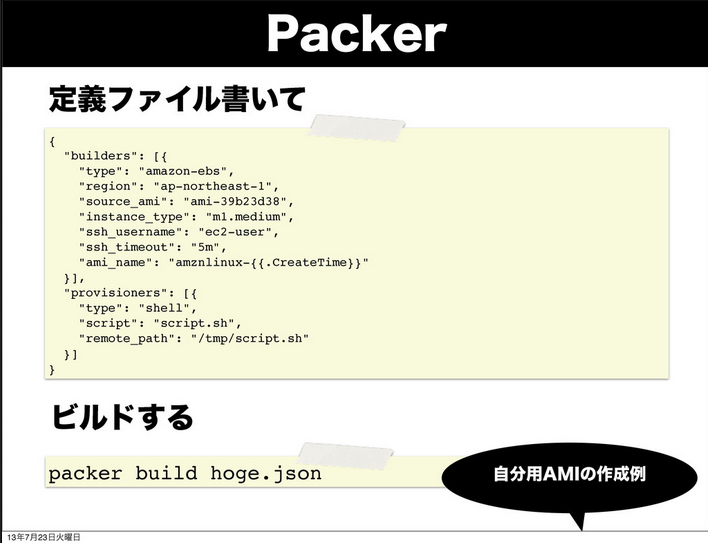
Packerというのをインストールしてみる。 PackerでVagrant用のBoxを作成したときのメモ
$ brew tap homebrew/binaryCloning into '/usr/local/Library/Taps/homebrew-binary'...remote: Reusing existing pack: 110, done.remote: Total 110 (delta 0), reused 0 (delta 0)Receiving objects: 100% (110/110), 16.96 KiB, done.Resolving deltas: 100% (51/51), done.Warning: Could not tap homebrew/binary/cmucl over mxcl/master/cmuclWarning: Could not tap homebrew/binary/grads over mxcl/master/gradsWarning: Could not tap homebrew/binary/jsl over mxcl/master/jslWarning: Could not tap homebrew/binary/lmutil over mxcl/master/lmutilWarning: Could not tap homebrew/binary/perforce-proxy over mxcl/master/perforce-proxyWarning: Could not tap homebrew/binary/perforce-server over mxcl/master/perforce-serverWarning: Could not tap homebrew/binary/perforce over mxcl/master/perforceTapped 10 formula
$ brew install packerError: Unsupported special dependency arch
インストールできない。 http://www.packer.io/downloads.htmlここにあった。
OSXでpackerでCentOS6.4のVirtualBox VMを作成する インストールできた。 でどう使うんでしょうか?
今日全部覚えるのは無理だな。色々なツールがあるし、そもそもよくわかってないし。 どうしたらいいのじゃ!まいった!時間がないのに!
ただし「このLinuxをAmazonクラウド以外で使えますか?」という問いには「いいえ、Amazon EC2以外で利用可能ではありません」と記されています。
とどこかに書いてあった。まあそうなのか。じゃあローカルに仮想環境つくるもくそもないのか。全くおんなじじゃないと意味ないっすからねえ。でもamazon linuxはec2でしか使えないならローカルで実現できるわけないし。
とりあえず便利そうなやつだけインストールしておこう。
$ vagrant plugin install sahara$ vagrant plugin install vagrant-vbguest$ vagrant plugin install vagrant-berkshelfで、一旦amazon linuxという呪縛から離れて、CentOS release 6.5の仮想マシンを立ち上げてみよう。ということはboxをhttp://www.vagrantbox.es/で探してみよう。CentOS 6.5 x86_64かな?? ってことは、こんな感じでやるのかな?
vagrant init centos6.5 https://github.com/2creatives/vagrant-centos/releases/download/v6.5.1/centos65-x86_64-20131205.box$ vagrant upBringing machine 'default' up with 'virtualbox' provider...[default] Box 'centos6.5' was not found. Fetching box from specified URL forthe provider 'virtualbox'. Note that if the URL does not havea box for this provider, you should interrupt Vagrant now and addthe box yourself. Otherwise Vagrant will attempt to download thefull box prior to discovering this error.Downloading box from URL: https://github.com/2creatives/vagrant-centos/releases/download/v6.5.1/centos65-x86_64-20131205.boxExtracting box...te: 1443k/s, Estimated time remaining: --:--:--)Successfully added box 'centos6.5' with provider 'virtualbox'![default] Importing base box 'centos6.5'...[default] Matching MAC address for NAT networking...[default] Setting the name of the VM...[default] Clearing any previously set forwarded ports...[default] Clearing any previously set network interfaces...[default] Preparing network interfaces based on configuration...[default] Forwarding ports...[default] -- 22 => 2222 (adapter 1)[default] Booting VM...[default] Waiting for machine to boot. This may take a few minutes...[default] Machine booted and ready!GuestAdditions versions on your host (4.3.6) and guest (4.3.4) do not match.Loaded plugins: fastestmirrorDetermining fastest mirrors * base: www.ftp.ne.jp * epel: mirror01.idc.hinet.net * extras: www.ftp.ne.jp * updates: centos.tt.co.krSetting up Install ProcessNo package kernel-devel-2.6.32-431.el6.x86_64 available.Package gcc-4.4.7-4.el6.x86_64 already installed and latest versionPackage 1:make-3.81-20.el6.x86_64 already installed and latest versionPackage 4:perl-5.10.1-136.el6.x86_64 already installed and latest versionNothing to doCopy iso file /Applications/VirtualBox.app/Contents/MacOS/VBoxGuestAdditions.iso into the box /tmp/VBoxGuestAdditions.isoInstalling Virtualbox Guest Additions 4.3.6 - guest version is 4.3.4Verifying archive integrity... All good.Uncompressing VirtualBox 4.3.6 Guest Additions for Linux............VirtualBox Guest Additions installerRemoving installed version 4.3.4 of VirtualBox Guest Additions...Copying additional installer modules ...Installing additional modules ...Removing existing VirtualBox non-DKMS kernel modules[ OK ]Building the VirtualBox Guest Additions kernel modulesThe headers for the current running kernel were not found. If the followingmodule compilation fails then this could be the reason.The missing package can be probably installed withyum install kernel-devel-2.6.32-431.el6.x86_64
Building the main Guest Additions module[FAILED](Look at /var/log/vboxadd-install.log to find out what went wrong)Doing non-kernel setup of the Guest Additions[ OK ]Installing the Window System drivers[FAILED](Could not find the X.Org or XFree86 Window System.)An error occurred during installation of VirtualBox Guest Additions 4.3.6. Some functionality may not work as intended.In most cases it is OK that the "Window System drivers" installation failed.Restarting VM to apply changes...[default] Attempting graceful shutdown of VM...[default] Booting VM...[default] Waiting for machine to boot. This may take a few minutes...[default] Machine booted and ready![default] Mounting shared folders...[default] -- /vagrantFailed to mount folders in Linux guest. This is usually beacusethe "vboxsf" file system is not available. Please verify thatthe guest additions are properly installed in the guest andcan work properly. The command attempted was:
mount -t vboxsf -o uid=`id -u vagrant`,gid=`getent group vagrant | cut -d: -f3` /vagrant /vagrantmount -t vboxsf -o uid=`id -u vagrant`,gid=`id -g vagrant` /vagrant /vagrantエラーがいっぱいでてるけど、vagrant sshしたらとりあえず入れる。
$ cat /etc/redhat-releaseCentOS release 6.5 (Final)ここに、Apache 2.2.15、Mysql 5.5.33、PHP 5.3.3これをchefで構築できるようにしたい。 でも時間かかるから、とりあえず普通にインストールしちゃって次のことするか。 次のことっていうのは、AMIを落として別のアカウントのEC2に適用するっていうのをしたいです。 あるいは、scpでソースコード移管して、DBに関しても移動させるか。システムログを消しても大丈夫かどうかだけど一般的にログは消しても大丈夫だからな。
さっきの、sudo yum groupinstall -y “Web Server” “MySQL Database” “PHP Support”をやってみたらmysqlがインストールできなかった。
http://qiita.com/srockstyle/items/8bed9550be75bf2e5e14これのとおりにやってみる。
EpelとRemiを入れる sudo -i rpm -Uvh http://download.fedoraproject.org/pub/epel/6/i386/epel-release-6-8.noarch.rpm rpm -Uvh http://rpms.famillecollet.com/enterprise/remi-release-6.rpm ## MySQLの5.5をremiから yum —enablerepo=remi install mysql-server mysql mysql-libs mysql-devel
できた。でも5.5.33がよかったんだけど、5.5.36だった。どうでもいいか。いいのかな?