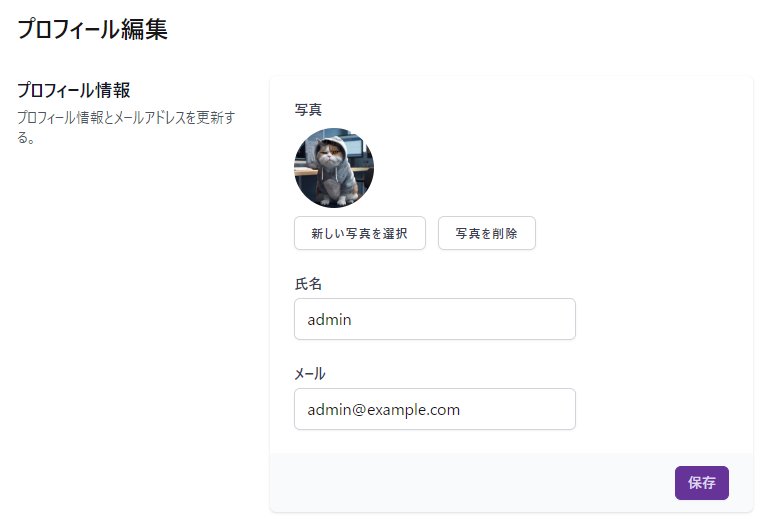
Laravel11でJetstreamのルートや言語やプロフィール画像の保存ロジックを変更する
環境
- windows11
- powershell
- php8.3
- Laravel11.22.0
- Livewire3
- jetstream5.2.0
ちなみに、下記でバージョンを表示できました。
composer show laravel/jetstreamjetstreamのプロフィール編集画面のルートを変えたい
routes/web.phpがある場所には、jetstreamのルート設定はありません。vendor内にありました。 vendor/laravel/jetstream/routes/livewire.php があって、内容は下記でした。 /user/profileに対するルート設定が書いてあります。
<?php
use Illuminate\Support\Facades\Route;use Laravel\Jetstream\Http\Controllers\CurrentTeamController;use Laravel\Jetstream\Http\Controllers\Livewire\ApiTokenController;use Laravel\Jetstream\Http\Controllers\Livewire\PrivacyPolicyController;use Laravel\Jetstream\Http\Controllers\Livewire\TeamController;use Laravel\Jetstream\Http\Controllers\Livewire\TermsOfServiceController;use Laravel\Jetstream\Http\Controllers\Livewire\UserProfileController;use Laravel\Jetstream\Http\Controllers\TeamInvitationController;use Laravel\Jetstream\Jetstream;
Route::group(['middleware' => config('jetstream.middleware', ['web'])], function () {    if (Jetstream::hasTermsAndPrivacyPolicyFeature()) {        Route::get('/terms-of-service', [TermsOfServiceController::class, 'show'])->name('terms.show');        Route::get('/privacy-policy', [PrivacyPolicyController::class, 'show'])->name('policy.show');    }
    $authMiddleware = config('jetstream.guard')        ? 'auth:'.config('jetstream.guard')        : 'auth';
    $authSessionMiddleware = config('jetstream.auth_session', false)        ? config('jetstream.auth_session')        : null;
    Route::group(['middleware' => array_values(array_filter([$authMiddleware, $authSessionMiddleware]))], function () {        // User & Profile...        Route::get('/user/profile', [UserProfileController::class, 'show'])->name('profile.show');
        Route::group(['middleware' => 'verified'], function () {            // API...            if (Jetstream::hasApiFeatures()) {                Route::get('/user/api-tokens', [ApiTokenController::class, 'index'])->name('api-tokens.index');            }
            // Teams...            if (Jetstream::hasTeamFeatures()) {                Route::get('/teams/create', [TeamController::class, 'create'])->name('teams.create');                Route::get('/teams/{team}', [TeamController::class, 'show'])->name('teams.show');                Route::put('/current-team', [CurrentTeamController::class, 'update'])->name('current-team.update');
                Route::get('/team-invitations/{invitation}', [TeamInvitationController::class, 'accept'])                    ->middleware(['signed'])                    ->name('team-invitations.accept');            }        });    });});
web.phpで設定を上書きする
例えば、jetstreamのプロフィール編集画面を/user/accountにアクセスしたときに表示させて、/user/profileにアクセスした場合は、全く別のページを表示させたいとします。
<?phpuse Laravel\Jetstream\Http\Controllers\Livewire\UserProfileController;
Route::get('/user/profile', App\Livewire\Pages\User\Profile::class)->name('profile.show');Route::get('/user/account', [UserProfileController::class, 'show'])->name('user-account');
これでできました。
日本語化する
これを使います。
https://github.com/Laravel-Lang/lang — github.com
使い方はこれです。
https://laravel-lang.com/packages-lang.html — laravel-lang.com
composer require --dev laravel-lang/langphp artisan lang:updateこれでできました。
プロフィール画像をS3に保存させる
プロフィール画像をリサイズしてS3に保存できるかやってみます。
app/Actions/Fortify/UpdateUserProfileInfomation.php にプロフィール更新関連のコードがあります。 プロフィール画像が設定されている場合、updateProfilePhoto を実行しています。 これは、 vendor/laravel/jetstream/src/HasProfilePhoto.php内にあります。これを上書きしてみます。
app/Traits/HasCustomProfilePhoto.php を作成します。 中身は下記です。
<?php
namespace App\Traits;
use Illuminate\Database\Eloquent\Casts\Attribute;use Illuminate\Http\UploadedFile;use Illuminate\Support\Facades\Storage;use Laravel\Jetstream\Features;use Illuminate\Support\Str;use Intervention\Image\ImageManager;use Intervention\Image\Drivers\Gd\Driver;
trait HasCustomProfilePhoto{  use \Laravel\Jetstream\HasProfilePhoto;
  /**   * Update the user's profile photo.   *   * @param  \Illuminate\Http\UploadedFile  $photo   * @return void   */  public function updateProfilePhoto(UploadedFile $photo)  {    $this->deleteProfilePhoto();
    $path = $this->getProfilePhotoPath();    $filename = pathinfo($path, PATHINFO_FILENAME);
    $manager = new ImageManager(new Driver());    $image = $manager->read($photo);
    $original = $image->toWebp();    $resized500 = $image->cover(500, 500)->toWebp();    $resized40 = $image->cover(40, 40)->toWebp();
    $disk = $this->profilePhotoDisk();    $disk->put($path, $original, 'public');    $disk->put($this->getResizedPhotoPath($filename, 500), $resized500, 'public');    $disk->put($this->getResizedPhotoPath($filename, 40), $resized40, 'public');
    $this->forceFill([      'profile_photo_path' => $path,    ])->save();  }
  /**   * Get the URL to the user's profile photo.   *   * @return string   */  public function profilePhotoUrl(): Attribute  {    return Attribute::get(function (): string {      return $this->getProfilePhotoUrl(40);    });  }
  /**   * Get the URL to the user's large profile photo.   *   * @return string   */  public function largeProfilePhotoUrl(): Attribute  {    return Attribute::get(function (): string {      return $this->getProfilePhotoUrl(500);    });  }
  /**   * Get the URL to the user's profile photo.   *   * @param  int  $size   * @return string   */  public function getProfilePhotoUrl($size = 40): string  {    if ($this->profile_photo_path) {      $filename = pathinfo($this->profile_photo_path, PATHINFO_FILENAME);      return env('R2_PUBLIC_URL') . '/' . $this->getResizedPhotoPath($filename, $size);    }    return $this->defaultProfilePhotoUrl();  }
  /**   * Process the profile photo.   *   * @param  \Illuminate\Http\UploadedFile  $photo   * @return string   */  protected function processProfilePhoto(UploadedFile $photo)  {    $manager = new ImageManager(new Driver());    $image = $manager->read($photo);
    $image->cover(500, 500);    return $image->toWebp();  }
  /**   * Get the path for the profile photo.   *   * @return string   */  protected function getProfilePhotoPath()  {    return 'user/' . $this->id . '/profile-image/' . Str::random(40) . '.webp';  }
  /**   * Get the resized photo path.   *   * @param  string  $filename   * @param  int  $size   * @return string   */  protected function getResizedPhotoPath($filename, $size)  {    return 'user/' . $this->id . '/profile-image/' . $filename . "_{$size}x{$size}.webp";  }
  /**   * Get the disk that profile photos should be stored on.   *   * @return \Illuminate\Contracts\Filesystem\Filesystem   */  protected function profilePhotoDisk()  {    return Storage::disk('r2');  }
  /**   * Delete the user's profile photo.   *   * @return void   */  public function deleteProfilePhoto()  {    if (! Features::managesProfilePhotos() || is_null($this->profile_photo_path)) {      return;    }
    $this->profilePhotoDisk()->deleteDirectory('user/' . $this->id . '/profile-image');
$this->forceFill([ 'profile_photo_path' => null, ])->save(); }}そして、Userモデルで利用するTraitを、HasCustomProfilePhotoに変更します。 上記はCloudflare R2に保存しており、diskの名前もS3ではなく、r2になっております。 アップロード画像を500x500と40x40にリサイズして、R2に保存しています。 $user->profile_photo_urlとやると、40x40の画像のURLが返ります。 $user->large_profile_photo_urlとやると、500x500のURLが返ります。