Python3 - PIL.Imageで画像を合体してテキストを書く
コードサンプル
from PIL import Image, ImageDraw
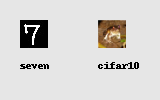
a = Image.open('img/seven.jpeg') #28 x 28b = Image.open('img/cifar1.png') #32 x 32b = b.resize((28, 28))a_txt = 'seven'b_txt = 'cifar10'
new = Image.new('RGB', (160, 100), (230, 230, 230))new.paste(a, (20, 20))new.paste(b, (20 + 28 + 50, 20))draw = ImageDraw.Draw(new)draw.text((20, 60), a_txt, fill='#000000')draw.text((20 + 28 + 50, 60), b_txt, fill='#000000')new.save('img/new.png')
結果