TensorflowでGPUが使えてるか確認する
環境
- ubuntu18.04
- python3.6
- tensorflow 1.13.1
- tensorflow-gpu 1.13.1
GPU
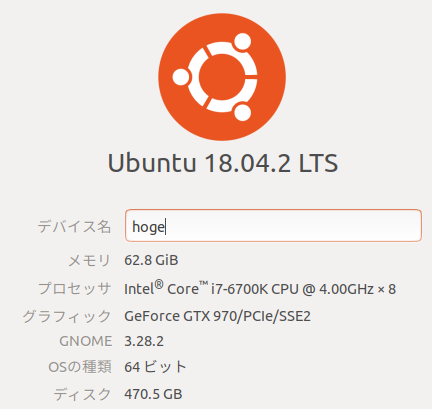
$ lspci | grep -i nvidia01:00.0 VGA compatible controller: NVIDIA Corporation GM204 [GeForce GTX 970] (rev a1)01:00.1 Audio device: NVIDIA Corporation GM204 High Definition Audio Controller (rev a1)$ cat /proc/driver/nvidia/versionNVRM version: NVIDIA UNIX x86_64 Kernel Module 418.39 Sat Feb 9 19:19:37 CST 2019GCC version: gcc version 7.3.0 (Ubuntu 7.3.0-27ubuntu1~18.04)$ nvcc -Vnvcc: NVIDIA (R) Cuda compiler driverCopyright (c) 2005-2019 NVIDIA CorporationBuilt on Fri_Feb__8_19:08:17_PST_2019Cuda compilation tools, release 10.1, V10.1.105pip list | grep pycudapycuda 2018.1.1$ apt list | grep tensornv-tensorrt-repo-ubuntu1804-cuda10.0-trt5.0.2.6-ga-20181009/now 1-1 amd64 [インストール済み、ローカル]r-cran-tensor/bionic,bionic 1.5-2 allxtensor-dev/bionic,bionic 0.10.11-1 allxtensor-doc/bionic,bionic 0.10.11-1 allxtensor-python-dev/bionic,bionic 0.12.4-1 allxtensor-python-doc/bionic,bionic 0.12.4-1 all$ nvidia-smiSat Mar 9 06:45:49 2019+-----------------------------------------------------------------------------+| NVIDIA-SMI 418.39 Driver Version: 418.39 CUDA Version: 10.1 ||-------------------------------+----------------------+----------------------+| GPU Name Persistence-M| Bus-Id Disp.A | Volatile Uncorr. ECC || Fan Temp Perf Pwr:Usage/Cap| Memory-Usage | GPU-Util Compute M. ||===============================+======================+======================|| 0 GeForce GTX 970 On | 00000000:01:00.0 On | N/A || 0% 43C P0 45W / 151W | 491MiB / 4039MiB | 1% Default |+-------------------------------+----------------------+----------------------+
+-----------------------------------------------------------------------------+| Processes: GPU Memory || GPU PID Type Process name Usage ||=============================================================================|| 0 1832 G /usr/lib/xorg/Xorg 260MiB || 0 2002 G /usr/bin/gnome-shell 133MiB || 0 3022 G ...quest-channel-token=4667018627475572094 93MiB |+-----------------------------------------------------------------------------+確認方法
下記でGPU使えてるか確認できるらしい。
from tensorflow.python.client import device_libdevice_lib.list_local_devices()こちらに書いてありました。
http://thr3a.hatenablog.com/entry/20180113/1515820265 — thr3a.hatenablog.com
結果
2019-03-09 06:30:33.408847: I tensorflow/core/platform/cpu_feature_guard.cc:141] Your CPU supports instructions that this TensorFlow binary was not compiled to use: AVX2 FMA2019-03-09 06:30:33.439051: I tensorflow/core/platform/profile_utils/cpu_utils.cc:94] CPU Frequency: 4008000000 Hz2019-03-09 06:30:33.439560: I tensorflow/compiler/xla/service/service.cc:150] XLA service 0x55bb5a801000 executing computations on platform Host. Devices:2019-03-09 06:30:33.439575: I tensorflow/compiler/xla/service/service.cc:158] StreamExecutor device (0): <undefined>, <undefined>GPUという表示がないので現状では使えていないらしい。
tensorflow-gpuを使えるようにする
tensorflowとtensorflow-gpuを両方入れてたらいけないのかも。
$ pip uninstall tensorflow$ pip install --upgrade pip setuptools wheel$ pip install -I tensorflow-gpu動くか確認
$ pythonPython 3.6.0 (default, Mar 7 2019, 22:28:33)[GCC 7.3.0] on linuxType "help", "copyright", "credits" or "license" for more information.>>> import tensorflow as tfTraceback (most recent call last):...ImportError: libcublas.so.10.0: cannot open shared object file: No such file or directory動かない。
原因
https://github.com/tensorflow/tensorflow/issues/26182 — github.com
CUDA10.0ではなく、CUDA10.1を使っているのが原因かも。やっぱだめかー。
NvidiaドライバとCUDAのバージョンを下げる
$ sudo apt install cuda-libraries-10-0$ sudo apt purge nvidia-driver-418$ sudo apt-get install --no-install-recommends nvidia-driver-410$ reboot動作チェック
$ python gpu_check.py2019-03-09 09:41:14.378974: I tensorflow/core/platform/cpu_feature_guard.cc:141] Your CPU supports instructions that this TensorFlow binary was not compiled to use: AVX2 FMA2019-03-09 09:41:14.516241: I tensorflow/stream_executor/cuda/cuda_gpu_executor.cc:998] successful NUMA node read from SysFS had negative value (-1), but there must be at least one NUMA node, so returning NUMA node zero2019-03-09 09:41:14.516758: I tensorflow/compiler/xla/service/service.cc:150] XLA service 0x5618aba42e90 executing computations on platform CUDA. Devices:2019-03-09 09:41:14.516777: I tensorflow/compiler/xla/service/service.cc:158] StreamExecutor device (0): GeForce GTX 970, Compute Capability 5.22019-03-09 09:41:14.536402: I tensorflow/core/platform/profile_utils/cpu_utils.cc:94] CPU Frequency: 4008000000 Hz2019-03-09 09:41:14.536878: I tensorflow/compiler/xla/service/service.cc:150] XLA service 0x5618aba74050 executing computations on platform Host. Devices:2019-03-09 09:41:14.536895: I tensorflow/compiler/xla/service/service.cc:158] StreamExecutor device (0): <undefined>, <undefined>2019-03-09 09:41:14.537021: I tensorflow/core/common_runtime/gpu/gpu_device.cc:1433] Found device 0 with properties:name: GeForce GTX 970 major: 5 minor: 2 memoryClockRate(GHz): 1.1775pciBusID: 0000:01:00.0totalMemory: 3.94GiB freeMemory: 3.46GiB2019-03-09 09:41:14.537033: I tensorflow/core/common_runtime/gpu/gpu_device.cc:1512] Adding visible gpu devices: 02019-03-09 09:41:14.538418: I tensorflow/core/common_runtime/gpu/gpu_device.cc:984] Device interconnect StreamExecutor with strength 1 edge matrix:2019-03-09 09:41:14.538432: I tensorflow/core/common_runtime/gpu/gpu_device.cc:990] 02019-03-09 09:41:14.538437: I tensorflow/core/common_runtime/gpu/gpu_device.cc:1003] 0: N2019-03-09 09:41:14.538532: I tensorflow/core/common_runtime/gpu/gpu_device.cc:1115] Created TensorFlow device (/device:GPU:0 with 3244 MB memory) -> physical GPU (device: 0, name: GeForce GTX 970, pci bus id: 0000:01:00.0, compute capability: 5.2)きてるー。
CPUとGPUの速度比較
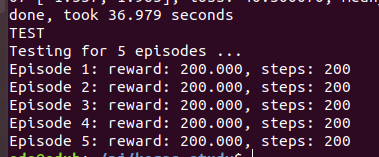
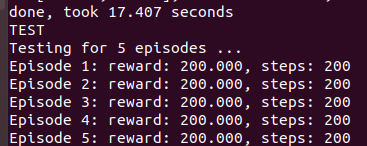
Open AI GymのCartPole-v0を学習するシンプルなコードで速度をはかったら、なんとCPUの方がGPUより倍以上速かったです。。なんか変だな。。とりあえず結果だけ掲載。
GPUの場合
CPUの場合
今度調べるか。。