M1 macのc++でGLFWを使ってみる
OpenGL についてまだ全然分かっていませんが、GLFW を使ってアニメーションを表示したいと思っています。とりあえず、M1 mac の c++でウインドウを表示しました。
目次
環境
> uname -marm64> brew configmacOS: 12.5-arm64Rosetta 2: falseGLFW をインストール
> brew install glfw> brew --prefix glfw/opt/homebrew/opt/glfwコンパイル・実行してみるコード
- ここの Example code
インストールしただけだとエラーになる
❯ g++ -o main main.cpp -lglfw -framework Cocoa -framework OpenGL -framework IOKit -framework CoreVideomain.cpp:1:10: fatal error: 'GLFW/glfw3.h' file not found#include <GLFW/glfw3.h>CPATH, LIBRARY_PATH を環境変数に追加
> vim ~/.zshrc# 下記を追加export CPATH=/opt/homebrew/includeexport LIBRARY_PATH=/opt/homebrew/libコンパイル・実行成功
- コンパイル成功したけど、warning が沢山出る。これは Apple が OpenGL を基本廃止(非推奨)にしているかららしい。
❯ g++ -o main main.cpp -lglfw -framework Cocoa -framework OpenGL -framework IOKit -framework CoreVideomain.cpp:23:5: warning: 'glClear' is deprecated: first deprecated in macOS 10.14 - OpenGL API deprecated. (Define GL_SILENCE_DEPRECATION to silence these warnings) [-Wdeprecated-declarations] glClear(GL_COLOR_BUFFER_BIT); ^/Library/Developer/CommandLineTools/SDKs/MacOSX.sdk/System/Library/Frameworks/OpenGL.framework/Headers/gl.h:2394:13: note: 'glClear' has been explicitly marked deprecated hereextern void glClear (GLbitfield mask) OPENGL_DEPRECATED(10.0, 10.14);warning を非表示にしてみる
- コードに下記を追加する。
#define GL_SILENCE_DEPRECATIONによって、非表示になる。
#ifdef __APPLE__#define GL_SILENCE_DEPRECATION#include <GLFW/glfw3.h>#endifMakefile を作る
CPPFLAGS := -I src/includesFRAMEWORKS := -framework Cocoa -framework OpenGL -framework IOKit -framework CoreVideoLIBS := -lglfw
BUILD_DIR := ./binSRC_DIRS := ./srcSRCS := $(shell find $(SRC_DIRS) -name *.cpp)OBJS := $(addprefix $(BUILD_DIR)/, $(subst .cpp,.o, $(notdir $(SRCS))))
$(BUILD_DIR)/main: $(OBJS)    clang++ -o $@ $(LIBS) $(FRAMEWORKS) $^$(BUILD_DIR)/%.o: src/%.cpp    clang++ -c -o $@ $(CPPFLAGS) $<
do:    @bin/mainclean:    rm -rf bin    mkdir bin
Debug できない
- vimspector で、
.vimspector.jsonを下記のように設定してみたけど、エラーになる。 -lglfwがあるとエラーになるっぽい。
{ "configurations": { "CodeLLDB": { "adapter": "CodeLLDB", "variables": { "BUILDME": { "shell": "clang++ -o ${workspaceRoot}/bin/debug -g -lglfw -framework Cocoa -framework OpenGL -framework IOKit -framework CoreVideo ${workspaceRoot}/src/main.cpp" } }, "configuration": { "request": "launch", "program": "${workspaceRoot}/bin/debug", "stdio": [null, null, null] } } }}青いウインドウを表示するコード
#ifdef __APPLE__#define GL_SILENCE_DEPRECATION#include <GLFW/glfw3.h>#endif
#include <iostream>using namespace std;
static void key_callback(GLFWwindow* window, int key, int scancode, int action, int mods) {  if (key == GLFW_KEY_ESCAPE && action == GLFW_PRESS)    glfwSetWindowShouldClose(window, GLFW_TRUE);}
int main(void) {  GLFWwindow* window;  if (!glfwInit()) return -1;
  glfwWindowHint(GLFW_CONTEXT_VERSION_MAJOR, 3);  glfwWindowHint(GLFW_CONTEXT_VERSION_MINOR, 2);  glfwWindowHint(GLFW_OPENGL_FORWARD_COMPAT, GL_TRUE);  glfwWindowHint(GLFW_OPENGL_PROFILE, GLFW_OPENGL_CORE_PROFILE);
  window = glfwCreateWindow(640, 480, "Hello World", NULL, NULL);  if (!window) {    cout << "failed to create window." << endl;    glfwTerminate();    return -1;  }  cout << "opened window" << endl;  glfwSetKeyCallback(window, key_callback);  glfwMakeContextCurrent(window);  glfwSwapInterval(1);
  const GLubyte* renderer = glGetString(GL_RENDERER);  const GLubyte* version = glGetString(GL_VERSION);  std::cout << "Renderer: " << renderer << std::endl;  std::cout << "OpenGL version supported: " << version << std::endl;
  glClearColor(0.0f, 0.3f, 0.6f, 0.3f);
  while (!glfwWindowShouldClose(window)) {    glClear(GL_COLOR_BUFFER_BIT);    glfwSwapBuffers(window);    glfwPollEvents();  }
  glfwTerminate();  cout << "closed window" << endl;}
リポジトリ
https://github.com/edo1z/cpp-glfw-1
表示されるウインドウ
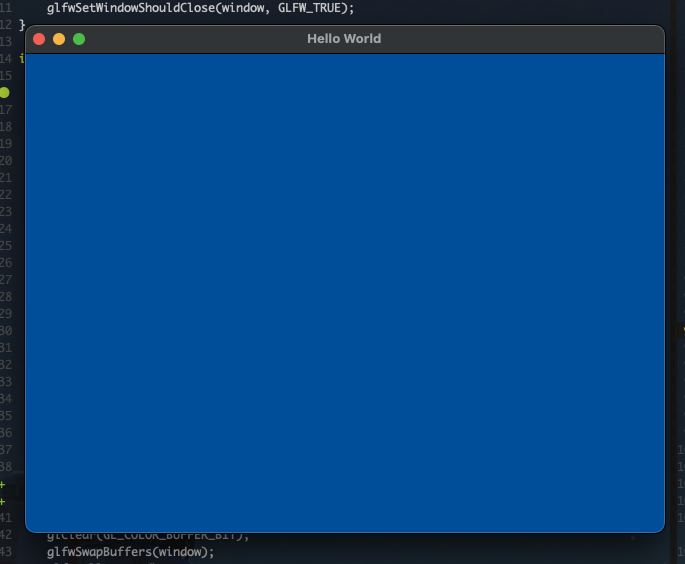 表示される青いウインドウ