cloud9でcakephp3・MySQLを使う
cloud9プロジェクトの作成
cloud9でPHPを選択してプロジェクトを作ります。
MySQLの起動
$ mysql-ctl startInstalling MySQL * Stopping MySQL database server mysqld   ...done. * Starting MySQL database server mysqld   ...done. * Checking for tables which need an upgrade, are corrupt or werenot closed cleanly.
MySQL 5.5 database added.  Please make note of these credentials:
       Root User: hgoe   Database Name: hoge
 * Starting MySQL database server mysqld   ...done.
phpMyAdminのインストール
$ phpmyadmin-ctl installStarting installationStarting MySQL * Starting MySQL database server mysqld   ...done.Configuring databaseStarting apache * Restarting web server apache2   ...done.PHPMyAdmin Installation complete. You can log in at: https://hoge-hoge.c9users.io/phpmyadmin with the following username (and blank password):
       Username: hoge
上記URLにアクセスしたらphpMyAdminが表示される。初期ではusernameと、パスワード空で入れる。root以外のユーザを作成したりする。
composerのインストール
$ curl -sS https://getcomposer.org/installer | phpDownloading 1.1.1...
Composer successfully installed to: /home/ubuntu/workspace/composer.pharUse it: php composer.pharSome settings on your machine may cause stability issues with Composer.If you encounter issues, try to change the following:
The xdebug extension is loaded, this can slow down Composer a little.Disabling it when using Composer is recommended.
composerを移動する
$ sudo mv composer.phar /usr/local/bin/composercakeプロジェクトの作成
$ composer create-project cakephp/app caketestYou are running composer with xdebug enabled. This has a major impact on runtime performance. See https://getcomposer.org/xdebug
Installing cakephp/app (3.2.6)  - Installing cakephp/app (3.2.6)    Downloading: 100%
Created project in caketestLoading composer repositories with package informationUpdating dependencies (including require-dev)  - Installing aura/installer-default (1.0.0)    Downloading: 100%
  - Installing cakephp/plugin-installer (0.0.15)    Downloading: 100%
  - Installing psr/log (1.0.0)    Downloading: 100%
  - Installing mobiledetect/mobiledetectlib (2.8.22)    Downloading: 100%
  - Installing aura/intl (1.1.1)    Downloading: 100%
  - Installing cakephp/chronos (0.4.9)    Downloading: 100%
  - Installing cakephp/cakephp (3.2.9)    Downloading: 100%
  - Installing symfony/yaml (v3.0.6)    Downloading: 100%
  - Installing symfony/filesystem (v3.0.6)    Downloading: 100%
  - Installing symfony/config (v3.0.6)    Downloading: 100%
  - Installing symfony/polyfill-mbstring (v1.2.0)    Downloading: 100%
  - Installing symfony/console (v3.0.6)    Downloading: 100%
  - Installing robmorgan/phinx (v0.5.3)    Downloading: 100%
  - Installing cakephp/migrations (1.6.1)    Downloading: 100%
  - Installing jakub-onderka/php-console-color (0.1)    Downloading: 100%
  - Installing jakub-onderka/php-console-highlighter (v0.3.2)    Downloading: 100%
  - Installing dnoegel/php-xdg-base-dir (0.1)    Downloading: 100%
  - Installing nikic/php-parser (v2.1.0)    Downloading: 100%
  - Installing symfony/var-dumper (v3.0.6)    Downloading: 100%
  - Installing psy/psysh (v0.7.2)    Downloading: 100%
  - Installing jdorn/sql-formatter (v1.2.17)    Downloading: 100%
  - Installing cakephp/debug_kit (3.2.8)    Downloading: 100%
  - Installing cakephp/bake (1.2.4)    Downloading: 100%
cakephp/app suggests installing phpunit/phpunit (Allows automated tests to be run without system-wide install.)cakephp/app suggests installing cakephp/cakephp-codesniffer (Allows to check the code against the coding standards used in CakePHP.)symfony/console suggests installing symfony/event-dispatcher ()symfony/console suggests installing symfony/process ()symfony/var-dumper suggests installing ext-symfony_debug ()psy/psysh suggests installing ext-pdo-sqlite (The doc command requires SQLite to work.)cakephp/debug_kit suggests installing ext-sqlite (DebugKit needs to store panel data in a database. SQLite is simple and easy to use.)Writing lock fileGenerating autoload files> Cake\Composer\Installer\PluginInstaller::postAutoloadDump> App\Console\Installer::postInstallCreated `config/app.php` fileSet Folder Permissions ? (Default to Y) [Y,n]? Permissions set on /home/ubuntu/workspace/caketest/tmp/cachePermissions set on /home/ubuntu/workspace/caketest/tmp/cache/modelsPermissions set on /home/ubuntu/workspace/caketest/tmp/cache/persistentPermissions set on /home/ubuntu/workspace/caketest/tmp/cache/viewsPermissions set on /home/ubuntu/workspace/caketest/tmp/sessionsPermissions set on /home/ubuntu/workspace/caketest/tmp/testsPermissions set on /home/ubuntu/workspace/caketest/tmpPermissions set on /home/ubuntu/workspace/caketest/logsUpdated Security.salt value in config/app.php
プレビューを見る
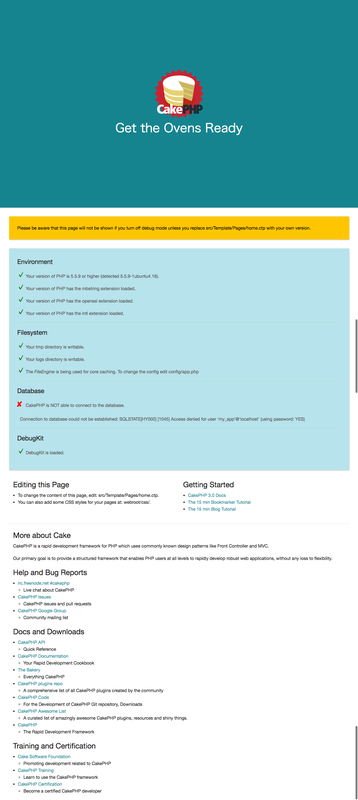
cloud9のメニューのPreviewからプレビューを開く。database.phpの設定がまだだが、とりあえず初期画面が表示される。
database.phpの設定
config/app.phpの229行目に下記があるので、修正する。
'username' => 'hoge','password' => 'hoge','database' => 'hoge','encoding' => 'utf8','timezone' => 'UTC','flags' => [],'cacheMetadata' => true,'log' => false,